
You can invest thousands of pounds into a beautiful solid-wood desk, a custom mechanical keyboard, and a crystal-clear multi-monitor setup—but if a massive, tangled rat’s nest of black power cables is dangling beneath your workspace, your office will still look chaotic.
Cable clutter isn’t just an eyesore; it’s a physical hazard. Loose cords trap dust, get crushed under your office chair wheels, and are easily yanked out by accident mid-workday. Furthermore, if you use an electric standing desk, unmanaged cables will snag and tear when the desk moves.
Managing your wires doesn’t require an engineering degree. By combining heavy-duty under-desk trays, sleek desktop organizers, and flexible cable sleeves, you can completely hide every single wire from sight. Here are the 10 best cable management tools for 2026.
Heavy-Duty Under-Desk Trays & Channels
1. Ascrono FlexGrid Under-Desk Cable Tray – The Best Overall No-Drill Tray
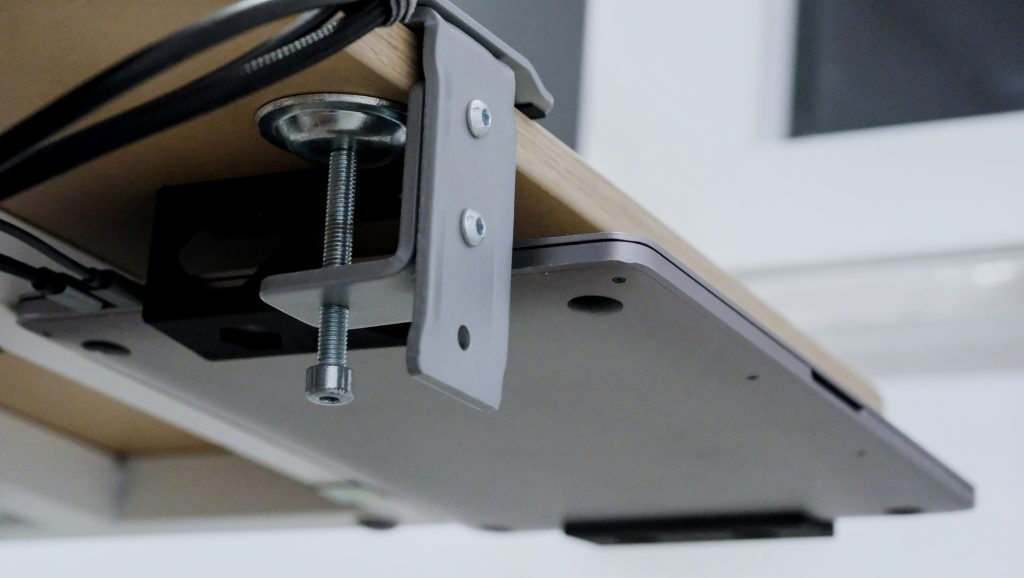
The Quick Verdict: For most people, the hardest part of cable management is the fear of drilling holes into their brand-new desk. The Ascrono FlexGrid completely solves this by using heavy-duty, padded C-clamps that lock securely onto your desk lip without a single screw.
Why We Love It:
No-Drill Clamp Mount: Installs in under two minutes via adjustable thumb-screws, leaving absolutely zero permanent marks or damage on your desktop.
Spacious Metal Mesh Design: The wide, steel-mesh basket is deep enough to hold two bulky power strips alongside massive laptop power bricks.
Perfect Thermal Airflow: Unlike enclosed plastic boxes, the open wire-mesh structure allows heat from your power adapters to dissipate safely, preventing overheating.
Easy Cable Threading: You can weave zip ties or velcro straps directly through any part of the metal grid to pin cables down completely flat.
The Cons:
Visible Clamps: The small top tops of the C-clamps will be subtly visible on the very back edge of your desktop.
Requires a Desk Lip: If your desk has a flush metal frame running right along the back edge, the clamps won’t have room to grab hold.
2. Stageek Aluminum Cable Raceway – The Best Sleek Enclosed Channel
The Quick Verdict: If you want a perfectly clean, industrial look where your cables are completely walled off inside a solid channel, the Stageek Raceway kit is brilliant. It mounts flat against the underside or rear edge of your desk using industrial-grade adhesive tape or small screws.
Why We Love It:
Slide-Cover Access: Built with a smooth, removable sliding top cover that lets you add or remove cables in seconds without tearing down the whole setup.
Pre-Cut Routing Slots: Features small parallel gaps along the entire length of the channel, allowing you to pop individual monitor or keyboard cables out exactly where they need to plug in.
Paintable Surface: The durable PVC/aluminum material can be easily painted to match the exact color of your walls or desk legs.
Modular Sections: Comes in a pack of multiple short tracks, allowing you to piece them together to fit short compact desks or massive L-shaped workstations.
The Cons:
Intense Adhesive: The included double-sided tape is incredibly strong. If you stick it to drywall, it will likely pull the paint off if you ever try to remove it.
Tight Fit for Power Bricks: While it holds dozens of standard cables beautifully, massive, blocky laptop chargers will not fit inside the enclosed channel.
3. VIVO Ergonomic Mesh Cable Cover – Best for Electric Standing Desks
The Quick Verdict: Standard rigid metal baskets work great for fixed desks, but when a standing desk glides up and down, cables can pull tight and snag. The VIVO Mesh Cover is a flexible, heavy-duty fire-resistant fabric sheet that buttons directly to the bottom of your desk, flexing dynamically with your setup’s movement.
Why We Love It:
Conceals Absolutely Everything: The thick, premium black fabric creates a solid visual screen, completely hiding a messy cluster of power strips and wires behind a clean, professional outline.
Easy Hook-and-Loop Access: Uses quick-release hook-and-loop strips so you can easily unclip a section, drop in a new phone charger cable, and seal it back up in seconds.
Ultra-Lightweight Profile: Adds zero meaningful weight to your desk frame, ensuring your electric desk motors don’t suffer from unnecessary strain.
Universal Compatibility: Can be screwed into any wooden or particleboard desktop surface regardless of the shape or size of your desk’s underframe.
The Cons:
Requires Screwing into the Desk: Unlike clamp models, you must use the included small wood screws to mount the fabric anchor points to the underside of your workspace.
Sleek On-Desk Organizers & Boxes
4. Anker Magnetic Cable Organizer – Best for Active Desktop Chargers
The Quick Verdict: We all know the daily annoyance of your phone, laptop, or wireless headphone charger sliding off the back of the desk the second you unplug it. The Anker Magnetic Organizer pins those active cables firmly to your desktop surface right at arm’s reach.
Why We Love It:
Smart Magnetic Collars: You wrap a tiny magnetic clip around your charging cable, and it snaps perfectly onto the weighted magnetic desk base with a highly satisfying click.
Damage-Free Restickable Base: The main base features a specialized silicone adhesive that sticks tightly to wood, glass, or metal, but can be peeled off and rinsed with water to be reused up to 10 times.
Clean Minimalist Profile: It has an incredibly small, premium footprint that looks like an intentional design accent rather than an ugly plastic cord holder.
Built-In Flexibility: The built-in magnetic channel holds standard cable weights effortlessly without restricting your ability to pull the cord forward when you need to use your phone.
The Cons:
Limited to 5 Cables: The base has room for exactly five magnetic collars. If you have an immense array of desktop gadgets, you will need to buy two.
5. D-Line Cable Management Box – The Best Floor & Desk Surface Cover
The Quick Verdict: If you have a cluster of plugs sitting on the floor next to your desk or right on top of your workstation, the D-Line Box is a gorgeous, curved storage container that acts as a physical camouflage shield for your extensions.
Why We Love It:
Stops Dust and Pet Interference: Enclosing your extension blocks inside a solid box completely protects them from accumulating thick layers of dust or being played with by curious pets and toddlers.
Dual-End Cable Exit Slots: Features clean, rounded exit slots on both sides, allowing cords to feed straight through smoothly without bending or crimping the wires.
Heavy-Duty Fire-Safe ABS Plastic: Fully safety-tested and constructed from robust, heat-resistant materials to ensure total peace of mind for heavy power setups.
Modern Curved Aesthetic: Features a sleek, modern curved lid that blends beautifully into minimalist rooms, effectively looking like a premium speaker or external hard drive box.
The Cons:
Occupies Physical Surface Space: Whether placed on the floor or on the corner of your desk, it requires its own flat footprint to sit on.
6. Sinjimoru Silicone Cable Clips – The Ultimate Budget Desktop Anchor
The Quick Verdict: If you want a simple, incredibly cheap, and completely hidden way to route individual mouse or keyboard cables along the edge of your desk, Sinjimoru’s silicone anchors are a massive favorite in the setup community.
Why We Love It:
Soft Premium Silicone: Built from highly flexible, eco-friendly silicone that won’t scratch your premium custom cables or wear out over time.
Multi-Slot Utility: Each individual clip features three distinct slot paths, allowing you to route multiple different lines through a single, tiny anchor point.
Strong 3M Adhesive Support: Powered by authentic 3M double-sided foam tape that locks onto wood composites, plastic monitor arms, or steel frames instantly.
Virtually Invisible: Their ultra-low-profile height means you can stick them right along the rear lip of your desk, hiding them entirely from view while sitting.
The Cons:
One-Time Use Tape: Once you stick a clip down, you cannot move it to a new location without applying a fresh piece of double-sided mounting tape.
The Essential Ties, Sleeves & Bundlers
7. Velcro Brand One-Wrap Cable Ties – The Ultimate Reusable Organizing Tool
The Quick Verdict: Throw away those cheap plastic zip ties that require scissors to cut open every time you buy a new piece of gear. Reusable Velcro One-Wrap rolls are the absolute single most important tool in any professional cable management arsenal.
Why We Love It:
Endless Reusability: You can peel them apart and seal them back up thousands of times, making it effortless to swap out broken cables or add new gear.
Zero Tool Strain: Fabric ties exert soft, uniform pressure, meaning they will never pinch, bite into, or damage delicate fiber-optic or high-speed data cords like plastic ties can.
Cut-to-Length Freedom: Comes in a continuous roll format, allowing you to use a standard pair of kitchen scissors to snip tiny 3-inch strips for headphones or massive 12-inch wraps for heavy extensions.
Strong Industrial Grab: Uses a self-engaging design where the hook layer binds tightly directly to the loop back, ensuring bundles don’t sag or shift over time.
The Cons:
Attracts Fabric Lint: Over months of sitting on carpeted floors, the hook side can accumulate loose dust or fabric fibers if left completely exposed.
8. Alex Tech Braided Cable Sleeve – The Best Bundle Concealer
The Quick Verdict: When you have three monitors, a webcam, and a desk lamp, you end up with a messy waterfall of five separate cords running down the back of your desk stand to the floor. The Alex Tech sleeve instantly zips them all together into a single, clean, professional-looking tube.
Why We Love It:
Self-Wrapping Split Design: Built with a lateral split that naturally springs back into a tight roll, meaning you can wrap it around a cluster of wires in seconds without unplugging a single machine.
Insulated Protection: Protects delicate cords from being chewed on by cats, dogs, or rabbits, saving you from expensive equipment replacement costs.
Clean Overlap Aesthetics: Completely replaces a sprawling clutter of mismatched black, white, and gray cables with a sleek, uniform woven-mesh finish.
Flexible Breakout Paths: If one monitor cable needs to leave the main bundle early, you can simply pull it out through the side split at any exact point along the sleeve’s length.
The Cons:
Fraying Edges When Cut: If you cut a long sleeve down to a shorter length, you must briefly use a lighter flame to melt the raw cut edge, or the mesh will begin to fray over time.
9. SOULWIT 50-Piece Self-Adhesive Cable Clamps – Best for Total Frame Routing
The Quick Verdict: To achieve true cable management mastery, your wires should never float freely through mid-air. They should run in straight lines along the hidden steel beams of your desk frame. This massive 50-piece pack gives you all the anchors you need to line your entire desk structure.
Why We Love It:
Massive Value Pack: Providing 50 individual clamps in a single box allows you to meticulously route your entire office setup, monitor arms, and TV entertainment units all at once.
Adjustable Ladder Lock Hinge: Features a notched plastic hinge that clicks into place across multiple sizing steps, letting you clamp down on a single thin wire or lock in a fat bundle tightly.
High-Speed Clean Layout: Instantly stops wires from dangling low enough to hit your knees or interfere with your floor space legroom.
Authentic 3M Backing pads: Pre-fitted with premium adhesive backing that binds incredibly well to smooth powder-coated metal desk legs.
The Cons:
Strict Surface Preparation Required: The adhesive will fail if applied to a dusty desk frame. You must wipe the metal down with a clean microfiber cloth or alcohol pad first before sticking them on.
10. J Channel Cable Raceway – The Ultimate Quick-Drop Rear Desk Wall
The Quick Verdict: J Channels are wide, open plastic troughs shaped like the letter “J”. They stick directly along the back edge of your desk, acting like an open gutter where you can simply drop cables inside from above without snapping any clips or opening slides.
Why We Love It:
The Fastest Cable Swapping: Because the top is entirely open, you don’t have to fiddle with straps, ties, or sliders. You literally just drop the wire into the slot, and gravity handles the rest.
Ideal for Shared Outlets: Perfect for home workers who frequently pack up their main laptop charger to take to a physical office space three days a week.
Thick Rigid Outer Barrier: Completely shields your wires from hitting the wall or getting pinched when pushing your desk flush against a room corner.
Pre-Applied Heavy Adhesive: Comes out of the box with wide strips of premium mounting tape already fixed to the back spine for instantaneous installation.
The Cons:
Gravity Dependent: It must be mounted horizontally. If you attempt to mount it vertically on a desk leg, the cables will simply slide right out of the bottom opening.
4. The Final Verdict
Which Cable Management Tool Do You Need First?
Completely clearing out your office’s wire clutter is easiest when you match the tools to your specific desk style:
If you want a massive, heavy-duty under-desk tray that requires absolutely zero drilling or tools to install, buy the Ascrono FlexGrid Tray.
If you want an elegant, high-tech way to stop your daily phone and laptop charging cables from falling behind your desk, get the Anker Magnetic Organizer.
If you want to bundle a messy waterfall of monitor and camera cords into a single clean column, wrap them inside the Alex Tech Braided Sleeve.
If you want a limitless supply of reusable, non-damaging ties to clean up loose loops across your entire office, grab a roll of Velcro Brand One-Wrap Ties.